In one of my earlier posts, a friend of mine commented that I would probably regret my purchase of the iPod Touch and should pick up a Zune. He knows how to get to me. Normally, I just write off his Microsoft-loving comments as gibberish. But before I did that, I figured I should actually go out and see what the differences are. Honestly, I had no idea what the Zune could or could not do. I've just never really cared about the Zune.
A Google search later, I am looking at a comparison of features between the iPod Touch and the Zune. Most of the features are really pretty much the same. Screen size, weight, battery life... (yawn). There is a couple of areas that stood out though. Turns out they each have something the other does not: The Zune has a FM tuner. The iPod Touch has the Internet.
Which one would you choose?
Sunday, March 23, 2008


Friday, March 14, 2008
Wake Up
I access my home computers from over the Internet all the time. Because of this, I typically leave them on 24x7 so that I can always log into them. Yeah, this uses some power, but the convenience of it has always been more important to me. I knew about wakeonlan capability, but just never took the time to figure it out.
After I read this write-up, I decided to bite the bullet and give it a try. Turns out to be way easier then I thought. You should give it a try!
I ended up using a different utility then the ones suggested in the article though. Since I tend to log in via ssh, I needed a utility that will work via command line. This one works nicely on my Mac (cuz OS X just comes with PERL out of the box). I also grabbed it on my Debian system with "apt-get install wakeonlan".
One thing to note, it will be easier to use this if you happen to recall the ethernet address of all your home machines. I could tell you that I have all mine memorized, but I would be lying. Instead, I just created a quick notebook on Google and stored them all there.
My machines now have power management settings enabled. They will enjoy a well deserved rest tonight. Give it a try and let me know how it goes...
After I read this write-up, I decided to bite the bullet and give it a try. Turns out to be way easier then I thought. You should give it a try!
I ended up using a different utility then the ones suggested in the article though. Since I tend to log in via ssh, I needed a utility that will work via command line. This one works nicely on my Mac (cuz OS X just comes with PERL out of the box). I also grabbed it on my Debian system with "apt-get install wakeonlan".
One thing to note, it will be easier to use this if you happen to recall the ethernet address of all your home machines. I could tell you that I have all mine memorized, but I would be lying. Instead, I just created a quick notebook on Google and stored them all there.
My machines now have power management settings enabled. They will enjoy a well deserved rest tonight. Give it a try and let me know how it goes...
Saturday, March 1, 2008
The Magic Touch
I got an iPod Touch the other day. Yes, they've been out for a while now, big deal. Some of my friends will tell you that I am afraid of new technology. They are liars.
At any rate, I got a used one from my cousin who recently upgraded to an iPhone. If not for that, I probably still wouldn't have one. I played around with it for about 4 hours last night and I'm just blown away by the possibilities in this little device.
However, I don't necessarily like it for the same reasons that Apple has intended. Sure, the screen is beautiful, and the form factor is nice. Problem is, I have a perfectly good iPod that plays music and video just fine. And no, I really don't need to watch it sideways. That isn't the reason that I like the Touch. The reason I like the Touch is twofold; the wi-fi capability, and the full web browser.
I carry a laptop for a living. It is a heavy beast and I have a bag full of accessories to go along with it. It certainly has its place, but I find that I won't take it into a coffee shop or some other place with wi-fi access because it is just to painful to lug it around, boot it up, and log in just to check my email or catch up on some RSS feeds. Sometimes, I feel like these guys.
Enter the Touch. It fits nicely in my laptop bag or in my pocket. It is flash based, boots immediately, and has a fully capable web browser. Take that, add in the excellent applications provided by Google, and I have a very powerful device that can replace my laptop in a lot of scenarios. Gmail and Greader are apps that I use daily. Both are quite usable on this handy little device. Next I will have to try creating one of these posts with it!
Do you have an iPod Touch or iPhone yet?
At any rate, I got a used one from my cousin who recently upgraded to an iPhone. If not for that, I probably still wouldn't have one. I played around with it for about 4 hours last night and I'm just blown away by the possibilities in this little device.
However, I don't necessarily like it for the same reasons that Apple has intended. Sure, the screen is beautiful, and the form factor is nice. Problem is, I have a perfectly good iPod that plays music and video just fine. And no, I really don't need to watch it sideways. That isn't the reason that I like the Touch. The reason I like the Touch is twofold; the wi-fi capability, and the full web browser.
I carry a laptop for a living. It is a heavy beast and I have a bag full of accessories to go along with it. It certainly has its place, but I find that I won't take it into a coffee shop or some other place with wi-fi access because it is just to painful to lug it around, boot it up, and log in just to check my email or catch up on some RSS feeds. Sometimes, I feel like these guys.
Enter the Touch. It fits nicely in my laptop bag or in my pocket. It is flash based, boots immediately, and has a fully capable web browser. Take that, add in the excellent applications provided by Google, and I have a very powerful device that can replace my laptop in a lot of scenarios. Gmail and Greader are apps that I use daily. Both are quite usable on this handy little device. Next I will have to try creating one of these posts with it!
Do you have an iPod Touch or iPhone yet?
Tuesday, February 5, 2008
The RSS Web We Weave
I ran across this just now. I'm not sure that it is something that I would use as I tend to just use my brain to filter out crap I don't want to read (hence, I don't click on it). However, I have mentioned here before that I'm a fan of AideRSS. As I thought about it some more, I guess you could called AideRSS a kind of filter. By using AideRSS, I depend on "the community" to filter out some crap for me.
What made me write this post however, was thinking about how many levels of indirection an RSS feed might pass through by the time I read it. Using my own feed as an example, I write it on Blogger, then I "burn" it with FeedBurner. There's one. Then, someone might use AideRSS to get out my "best" posts. There's two. Next, they might run it through FeedRinse to cleanse out the content they find objectionable. There's three. Now, that it's clean, they might do God knows what with it after running it through Yahoo Pipes. There's four. And that is before they even see it in their aggregator, which may have another set of tags, virtual folders, or searches. Wow....
The Windows guys won't get this, but those whole idea just parallels so well with the philosophy of the *nix operating system.
What made me write this post however, was thinking about how many levels of indirection an RSS feed might pass through by the time I read it. Using my own feed as an example, I write it on Blogger, then I "burn" it with FeedBurner. There's one. Then, someone might use AideRSS to get out my "best" posts. There's two. Next, they might run it through FeedRinse to cleanse out the content they find objectionable. There's three. Now, that it's clean, they might do God knows what with it after running it through Yahoo Pipes. There's four. And that is before they even see it in their aggregator, which may have another set of tags, virtual folders, or searches. Wow....
The Windows guys won't get this, but those whole idea just parallels so well with the philosophy of the *nix operating system.
Write programs that do one thing and do it well.
Write programs to work together.
Write programs to handle text streams, because that is a universal interface.
Saturday, December 29, 2007
Mobile phone usage analysis
I mentioned earlier that I am using the Tmobile "myFaves" plan. This plan allows me unlimited calling to five numbers and 300 minutes to all other numbers. Now, there are two, maybe three, people that I talk to regularly so they instantly went into my "faves". For the remaining slots available, I want to make sure that I am getting the numbers in there that I talk to frequently. Since I'm allowed to make changes once per month, I have been going through a quick spreadsheet analysis to determine which numbers I am using the most and ensure they are in my "faves".
To do this analysis, I first downloaded my call records from Tmobile's website. They offer the ability to download in a CSV format making it easy to import into your favorite spreadsheet.
I, then, created a pivot table on my call data. (If your favorite spreadsheet cannot do pivot tables, then get the free OpenOffice application.) To create the pivot table, I simply highlight the data, drag the "minutes" column into the main data space, drag the "numbers" column into the left-hand row space, and click "done".
Once the pivot table has aggregated all my minutes by number, I then highlighted that dataset, sort descending by minutes, and I now have a nice list of my most frequently used numbers!
Using the top five of these numbers, I go back to Tmobile's website (which has timed out my login. Nice.) and "manage" my "faves". This has been a very useful activity taking about 10 minutes once per month. This activity really saved me last month when a friend that is on my list of five changed their phone number. I updated it in my phone's contact list, but did not remember to update my "faves" until just now when I looked at the data. It would be nice if Tmobile would aggregate the data in this way, but I suspect it is not in their interest for me to have a finely tuned "fave" list.
To do this analysis, I first downloaded my call records from Tmobile's website. They offer the ability to download in a CSV format making it easy to import into your favorite spreadsheet.
I, then, created a pivot table on my call data. (If your favorite spreadsheet cannot do pivot tables, then get the free OpenOffice application.) To create the pivot table, I simply highlight the data, drag the "minutes" column into the main data space, drag the "numbers" column into the left-hand row space, and click "done".
Once the pivot table has aggregated all my minutes by number, I then highlighted that dataset, sort descending by minutes, and I now have a nice list of my most frequently used numbers!
Using the top five of these numbers, I go back to Tmobile's website (which has timed out my login. Nice.) and "manage" my "faves". This has been a very useful activity taking about 10 minutes once per month. This activity really saved me last month when a friend that is on my list of five changed their phone number. I updated it in my phone's contact list, but did not remember to update my "faves" until just now when I looked at the data. It would be nice if Tmobile would aggregate the data in this way, but I suspect it is not in their interest for me to have a finely tuned "fave" list.
Sunday, December 16, 2007
Local Shared Objects (aka: Flash cookies)
Just when you thought you were protecting your privacy by preventing cookies being stored on your computer, The Man has found another way to do the same thing.
The Man's new trick is called "Local Shared Objects" (LSO). LSO describes the capability of Adobe's Flash software to store information on your computer without you knowing about it. Furthermore, other websites can access this information to understand more about you and places that you have visited before.
Adobe provides a tool to give you control over how LSOs are stored on your computer. I highly suggest that you check this out and alter the default settings for your computer. To use the tool, log onto the Settings Manager, and jump over to the "Website Privacy Settings Panel".
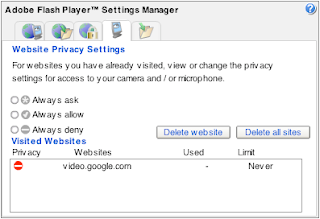
You will likely see a long list of "Visited Websites". As soon as I saw this, I immediately hit the "Delete all sites" button and then thought about taking a picture. Oh well...
Browse through each of the tabs along the top. If you are like me, you will be appalled at some of the default settings. (Why yes, actually, I would like third parties to access my webcam!) For example, the default setting on the "Storage Settings" tab allows every website to store up to 100KB of data on your computer! Move that slider to zero, pronto.
Next, head on over to the "Global Storage Settings Panel" and un-check the option to "Allow third party Flash content to store data on your computer". This is supposed to prevent any future storage of LSOs on your computer. I will be watching mine closely to see how it works.
I supposed we should be grateful that The Man (Adobe, in this case) provides the Settings Manager in the first place. I just wish the defaults for this kind of stuff were in favor of my privacy instead of the other way around.
Oh, and don't forget to load up the Settings Manager on every computer you use. Yes, it is too much to ask to only do it once.
The Man's new trick is called "Local Shared Objects" (LSO). LSO describes the capability of Adobe's Flash software to store information on your computer without you knowing about it. Furthermore, other websites can access this information to understand more about you and places that you have visited before.
Adobe provides a tool to give you control over how LSOs are stored on your computer. I highly suggest that you check this out and alter the default settings for your computer. To use the tool, log onto the Settings Manager, and jump over to the "Website Privacy Settings Panel".

You will likely see a long list of "Visited Websites". As soon as I saw this, I immediately hit the "Delete all sites" button and then thought about taking a picture. Oh well...
Browse through each of the tabs along the top. If you are like me, you will be appalled at some of the default settings. (Why yes, actually, I would like third parties to access my webcam!) For example, the default setting on the "Storage Settings" tab allows every website to store up to 100KB of data on your computer! Move that slider to zero, pronto.
Next, head on over to the "Global Storage Settings Panel" and un-check the option to "Allow third party Flash content to store data on your computer". This is supposed to prevent any future storage of LSOs on your computer. I will be watching mine closely to see how it works.
I supposed we should be grateful that The Man (Adobe, in this case) provides the Settings Manager in the first place. I just wish the defaults for this kind of stuff were in favor of my privacy instead of the other way around.
Oh, and don't forget to load up the Settings Manager on every computer you use. Yes, it is too much to ask to only do it once.
Sunday, November 25, 2007
Take back your email address
How many times a week do you get prompted for an email address while you are surfing the ol' web? Once? Three times? Multiple times a day? It probably depends on what kind of surfing you do, but it seems that every site wants your address these days. They assure you that they won't sell it or rent it to anyone else, and I'll actually giving them the benefit of the doubt that they honor this promise.
Yet, when you hand it over in order to get some free download or other wares, the marketing campaigns begin. I'm not necessarily talking about spam, although that is certainly something to be concerned about. No, I'm referring to the continuing stream of "special deals", coupons, and other crap that companies want to send you.
Here's another scenario that gets to me regularly. I need to purchase a hard to find item. The big stores that I usually do business with don't have it, so I have to Google for a niche website that carries it. While I'm glad to have found the item in question, I now have to give my address. Now, I do want to get things like shipping notices and order confirmations, but I don't want all the stuff that comes after I've received my order.
So, there's the problem. Now, for the solution. To key to preventing someone keeping your address longer then you want them to is to use a disposable address! If the address they have no longer goes to my primary inbox, then I have no problem at all with them keeping it on file for as long as they want. :)
The great folks over at spamgourmet have provided a service that does this. To use this service, you need to create a login and give them your primary email address. (I know, I know... don't worry, this is the last time you need to surrender your "real" address) Once you have a login name, you are ready to go. Next time you are asked to provide an address, you just follow a pattern. The pattern looks like this:
In the pattern above, you would replace the text "label" with a unique string that is meaningful to you. I usually use the name of the company or website that I am filling out. (This gives me the added advantage of knowing if they did sell their email list to another firm.) Next, you replace the text "number" with a number, either numeric or fully spelled out. Finally, you replace the text "login" with the login name that you created when you originally signed up and keep everything else the same. Here is how it might look:
The number in the middle is really the interesting part of all this. Basically, the way that this works is that Best Buy (in my example) will send email to the spamgourmet address. Spamgourmet will then forward the email to my real address if I have received less then 6 messages to the spamgourmet address. Once, I have received 6 messages, then spamgourmet will no longer forward them. They call this "eating" my spam. Next time I actually want to buy something from Best Buy, I login to spamgourmet, search for my bestbuy disposable address, and tell them I want to receive 6 more messages. Easy!
To show how much of an impact this has made for me, I'll publish my stats. These are provided by spamgourmet. "Your message stats: 1,428 forwarded, 18,458 eaten. You have 149 disposable address(es)." This gives me a ratio of almost 13 messages "eaten" for every 1 that I've actually received. Wow...
Oh, and did I mention that spamgourmet is free?
Yet, when you hand it over in order to get some free download or other wares, the marketing campaigns begin. I'm not necessarily talking about spam, although that is certainly something to be concerned about. No, I'm referring to the continuing stream of "special deals", coupons, and other crap that companies want to send you.
Here's another scenario that gets to me regularly. I need to purchase a hard to find item. The big stores that I usually do business with don't have it, so I have to Google for a niche website that carries it. While I'm glad to have found the item in question, I now have to give my address. Now, I do want to get things like shipping notices and order confirmations, but I don't want all the stuff that comes after I've received my order.
So, there's the problem. Now, for the solution. To key to preventing someone keeping your address longer then you want them to is to use a disposable address! If the address they have no longer goes to my primary inbox, then I have no problem at all with them keeping it on file for as long as they want. :)
The great folks over at spamgourmet have provided a service that does this. To use this service, you need to create a login and give them your primary email address. (I know, I know... don't worry, this is the last time you need to surrender your "real" address) Once you have a login name, you are ready to go. Next time you are asked to provide an address, you just follow a pattern. The pattern looks like this:
label.number.login@spamgourmet.com
In the pattern above, you would replace the text "label" with a unique string that is meaningful to you. I usually use the name of the company or website that I am filling out. (This gives me the added advantage of knowing if they did sell their email list to another firm.) Next, you replace the text "number" with a number, either numeric or fully spelled out. Finally, you replace the text "login" with the login name that you created when you originally signed up and keep everything else the same. Here is how it might look:
bestbuy.6.michaelscott@spamgourmet.com
The number in the middle is really the interesting part of all this. Basically, the way that this works is that Best Buy (in my example) will send email to the spamgourmet address. Spamgourmet will then forward the email to my real address if I have received less then 6 messages to the spamgourmet address. Once, I have received 6 messages, then spamgourmet will no longer forward them. They call this "eating" my spam. Next time I actually want to buy something from Best Buy, I login to spamgourmet, search for my bestbuy disposable address, and tell them I want to receive 6 more messages. Easy!
To show how much of an impact this has made for me, I'll publish my stats. These are provided by spamgourmet. "Your message stats: 1,428 forwarded, 18,458 eaten. You have 149 disposable address(es)." This gives me a ratio of almost 13 messages "eaten" for every 1 that I've actually received. Wow...
Oh, and did I mention that spamgourmet is free?
Subscribe to:
Posts (Atom)


