Just when you thought you were protecting your
privacy by preventing
cookies being stored on your computer, The Man has found another way to do the same thing.
The Man's new trick is called "
Local Shared Objects" (LSO). LSO describes the capability of Adobe's
Flash software to store information on your computer without you knowing about it. Furthermore, other websites can access this information to understand more about you and places that you have visited before.
Adobe provides a
tool to give you control over how LSOs are stored on your computer. I highly suggest that you check this out and alter the default settings for your computer. To use the tool, log onto the
Settings Manager, and jump over to the "
Website Privacy Settings Panel".
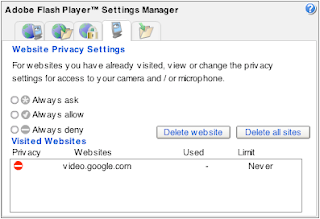
You will likely see a long list of "Visited Websites". As soon as I saw this, I immediately hit the "Delete all sites" button and then thought about taking a picture. Oh well...
Browse through each of the tabs along the top. If you are like me, you will be appalled at some of the default settings. (Why yes, actually, I would like third parties to access my webcam!) For example, the default setting on the "Storage Settings" tab allows every website to store up to 100KB of data on your computer! Move that slider to zero, pronto.
Next, head on over to the "
Global Storage Settings Panel" and un-check the option to "Allow third party Flash content to store data on your computer". This is supposed to prevent any future storage of LSOs on your computer. I will be watching mine closely to see how it works.
I supposed we should be grateful that The Man (Adobe, in this case) provides the Settings Manager in the first place. I just wish the defaults for this kind of stuff were in favor of my privacy instead of the other way around.
Oh, and don't forget to load up the Settings Manager on every computer you use. Yes, it is too much to ask to only do it once.


